.jpg)
Context Center for CX: Curing the "Stale Knowledge" Problem
In our prior installment of the series on Agent Harness, we covered how Safe Workspaces and Controlled Rollouts eliminate the fear of breaking the live customer experience. But safely deploying an update is only half the battle. The other half is ensuring the agent's "brain" is perfectly synced with your ever-changing business.
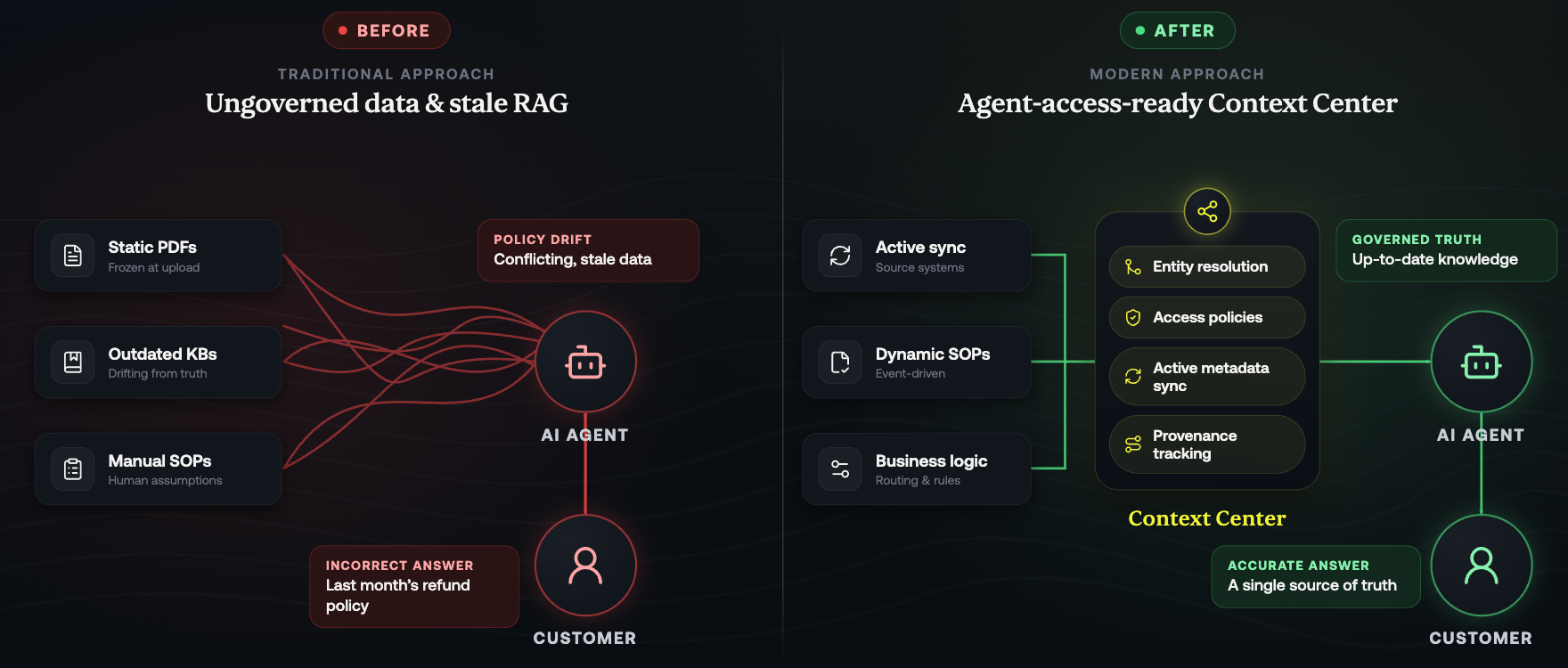
If your team is trying to build or manage AI agents today, you are likely intimately familiar with the Business Logic Bottleneck. Transferring your unique business logic, IVR routing trees, agent support workflows, and compliance rules into an AI agent requires a massive amount of manual effort.
Once you finally get it built, you are immediately hit with the "Stale Knowledge" Crisis. Companies constantly update their internal policies, pricing, and FAQs. However, the AI agent's knowledge does not automatically update alongside them. Finding out an IVR agent is quoting last month's refund policy to a customer simply because nobody manually updated the AI's knowledge base is a massive business liability.
To fix this, we need to stop treating AI as a static, set-it-and-forget-it tool.
The Trap of Human SOPs and Raw RAG
When an operations team wants to train a human agent, they hand them a Standard Operating Procedure (SOP). Standard Operating Procedures written for humans tend to make a lot of assumptions. They expect the reader to fill in gaps, use judgment, and draw on experience.
AI doesn't work that way. It needs explicit instructions for every scenario it might encounter. If you simply dump your existing PDFs and knowledge base (KB) articles into a basic Retrieval-Augmented Generation (RAG) system, the agent will inevitably fail. RAG without a context layer is retrieval from ungoverned data. The agent finds semantically similar text, but that text may carry conflicting definitions, stale numbers, or data the requesting user is not authorized to see.
Enter the Context Center: Making Your Business "Agent Access Ready"
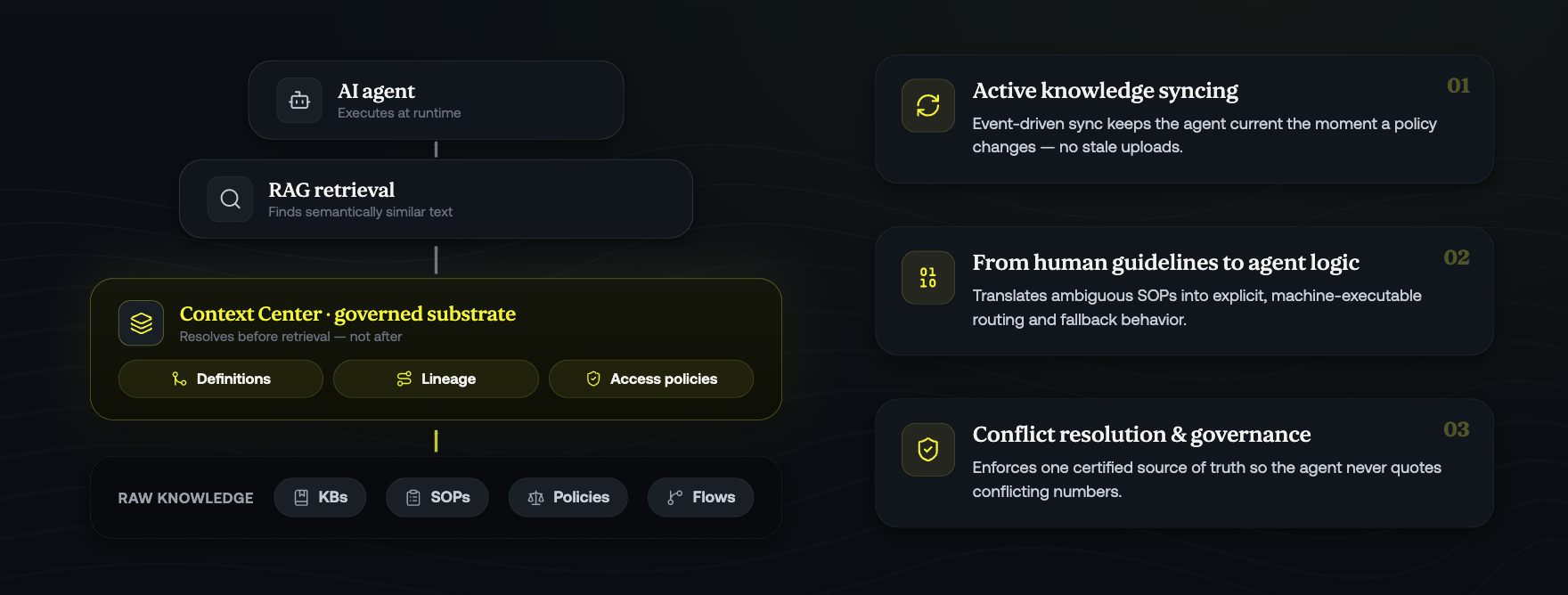
To dismantle the business logic bottleneck, your Agent Harness needs a governed data substrate that sits beneath RAG. We call this the Context Center.
Rather than just retrieving text, a context layer resolves definitions, lineage, and access policies before retrieval begins. It acts as a centralized hub that syncs all your business processes, KBs, SOPs, and conversation flows, translating them into a format that AI agents can perfectly understand and execute.
Here is how the Context Center powers intelligent management:
- Active Knowledge Syncing: Instead of relying on static document uploads that immediately go out of date, the Context Center utilizes event-driven sync with source systems. When a human updates a policy in your KB, the Context Center prevents staleness by ensuring those active metadata updates are immediately available to the agent.
- From Human Guidelines to Agent Logic: The Context Center translates ambiguous human guidelines into explicit, machine-executable logic. It bridges the gap between unstructured knowledge and the strict routing trees and fallback behavior your operations demand.
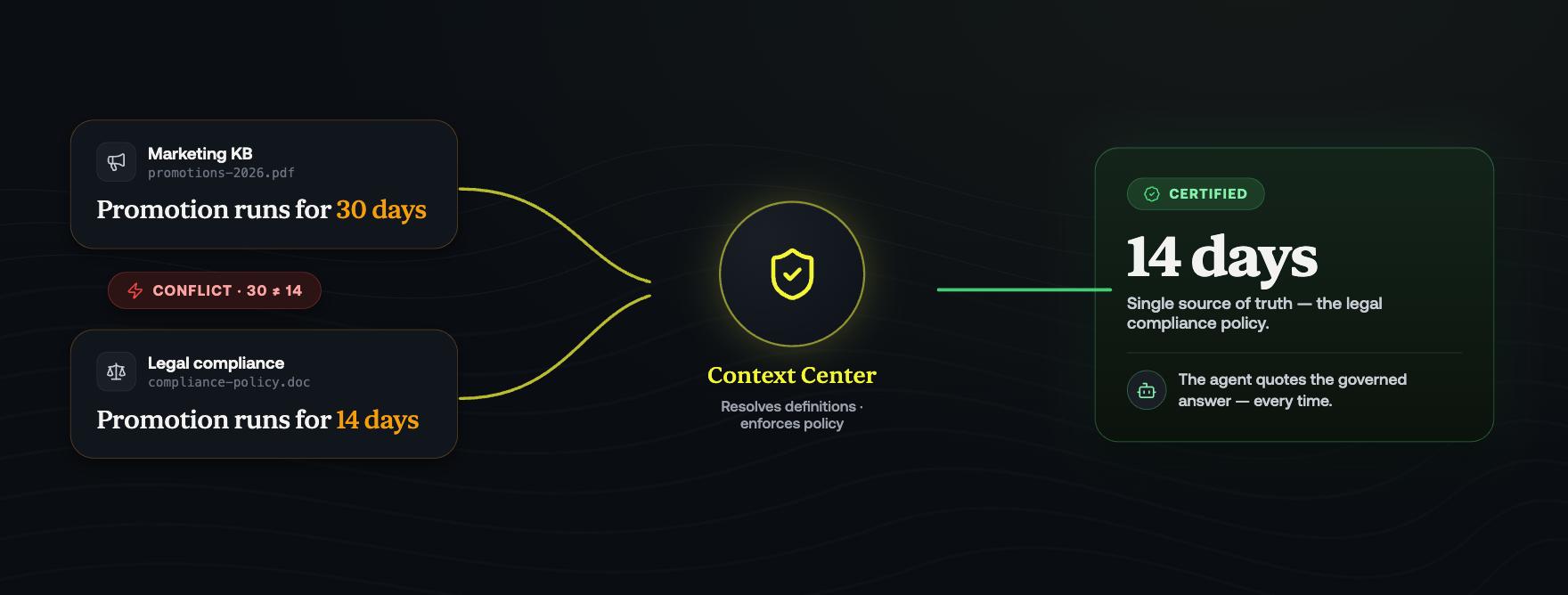
- Conflict Resolution and Governance: If your marketing KB says a promotion lasts 30 days, but your legal compliance document says 14 days, a raw AI model will get confused. The Context Center resolves entity definitions and enforces policies so the agent relies only on a single, certified source of truth.
Escaping the Manual Setup
By establishing a Context Center, you ensure your business data is fundamentally "agent access ready." Your knowledge base, SOPs, and policies are no longer disconnected documents; they are a living, governed substrate that your AI can safely query at runtime.
But once your data is perfectly structured and synced, how do you actually build the agent without writing endless lines of code?
Stay tuned for Intelligent Building & Management, where we will explore the AI CoBuilder—an AI agent designed to automatically build and optimize the agents themselves based on your freshly synced context.
Subscribe to our newsletter.
Frequently Answered Questions


.png)

.png)
.png)